<!DOCTYPE html>
<html>
<head>
<meta http-equiv="Content-Type" content="text/html; charset=UTF-8">
<meta name="viewport" content="width=device-width, initial-scale=1.0, user-scalable=yes">
<title>Click, drag, or scroll with the touchpad</title>
<link rel="stylesheet" type="text/css" href="../pintail-mallard-tr.css">
<script type="text/javascript" src="../highlight.pack.js"></script><script>
document.addEventListener('DOMContentLoaded', function() {
  var matches = document.querySelectorAll('code.syntax')
  for (var i = 0; i < matches.length; i++) {
    hljs.highlightBlock(matches[i]);
  }
}, false);</script><script type="text/javascript" src="../yelp.js"></script>
</head>
<body lang="tr" dir="ltr">
<header class="gnome-header"><nav><div class="pagewide">
<a id="home-link" class="gnome-navbar-brand" href="../index.html" title="Go to home page"><h1>GNOME Help</h1></a><details class="gnome-langs gnome-langs-wide"><summary title="Change language" aria-label="Change language"><span class="gnome-langs-current">tr</span></summary><ul>
<li><a href="mouse-touchpad-click.html.ca">català</a></li>
<li><a href="mouse-touchpad-click.html.cs">čeština</a></li>
<li><a href="mouse-touchpad-click.html.da">dansk</a></li>
<li><a href="mouse-touchpad-click.html.de">Deutsch</a></li>
<li><a href="mouse-touchpad-click.html">English</a></li>
<li><a href="mouse-touchpad-click.html.es">español</a></li>
<li><a href="mouse-touchpad-click.html.eu">euskara</a></li>
<li><a href="mouse-touchpad-click.html.fr">français</a></li>
<li><a href="mouse-touchpad-click.html.gl">galego</a></li>
<li><a href="mouse-touchpad-click.html.hr">hrvatski</a></li>
<li><a href="mouse-touchpad-click.html.id">Indonesia</a></li>
<li><a href="mouse-touchpad-click.html.it">italiano</a></li>
<li><a href="mouse-touchpad-click.html.lv">latviešu</a></li>
<li><a href="mouse-touchpad-click.html.lt">lietuvių</a></li>
<li><a href="mouse-touchpad-click.html.hu">magyar</a></li>
<li><a href="mouse-touchpad-click.html.nl">Nederlands</a></li>
<li><a href="mouse-touchpad-click.html.pl">polski</a></li>
<li><a href="mouse-touchpad-click.html.pt">português</a></li>
<li><a href="mouse-touchpad-click.html.pt_BR">português (Brasil)</a></li>
<li><a href="mouse-touchpad-click.html.ro">română</a></li>
<li><a href="mouse-touchpad-click.html.sl">slovenščina</a></li>
<li><a href="mouse-touchpad-click.html.sr@latin">srpski (latinica)</a></li>
<li><a href="mouse-touchpad-click.html.fi">suomi</a></li>
<li><a href="mouse-touchpad-click.html.sv">svenska</a></li>
<li><a href="mouse-touchpad-click.html.vi">Tiếng Việt</a></li>
<li><a href="mouse-touchpad-click.html.tr" aria-current="true">Türkçe</a></li>
<li><a href="mouse-touchpad-click.html.el">Ελληνικά</a></li>
<li><a href="mouse-touchpad-click.html.ru">русский</a></li>
<li><a href="mouse-touchpad-click.html.sr">српски</a></li>
<li><a href="mouse-touchpad-click.html.uk">українська</a></li>
<li><a href="mouse-touchpad-click.html.kk">қазақ тілі</a></li>
<li><a href="mouse-touchpad-click.html.he" dir="rtl">עברית</a></li>
<li><a href="mouse-touchpad-click.html.fa" dir="rtl">فارسی</a></li>
<li><a href="mouse-touchpad-click.html.mr">मराठी</a></li>
<li><a href="mouse-touchpad-click.html.hi">हिन्दी</a></li>
<li><a href="mouse-touchpad-click.html.as">অসমীয়া</a></li>
<li><a href="mouse-touchpad-click.html.pa">ਪੰਜਾਬੀ</a></li>
<li><a href="mouse-touchpad-click.html.gu">ગુજરાતી</a></li>
<li><a href="mouse-touchpad-click.html.ta">தமிழ்</a></li>
<li><a href="mouse-touchpad-click.html.te">తెలుగు</a></li>
<li><a href="mouse-touchpad-click.html.kn">ಕನ್ನಡ</a></li>
<li><a href="mouse-touchpad-click.html.th">ไทย</a></li>
<li><a href="mouse-touchpad-click.html.ko">한국어</a></li>
<li><a href="mouse-touchpad-click.html.zh_CN">中文 (简体, 中国)</a></li>
<li><a href="mouse-touchpad-click.html.ja">日本語</a></li>
</ul></details>
</div></nav></header><main><aside class="sidebar sidebar-left"><div class="sidebar-contents"><div class="inner">
<div class="title"><h2><span class="title">İçerik</span></h2></div>
<div class="region"><div class="contents"><ul>
<li class="links"><a href="../gnome-help/index.html.tr" title="GNOME Yardım">GNOME Yardım</a></li>
<li class="links"><a href="../gnome-help/shell-exit.html.tr" title="Log out, power off or switch users">Log out, power off or switch users</a></li>
<li class="links"><a href="../gnome-help/shell-apps-open.html.tr" title="Start applications">Start applications</a></li>
<li class="links"><a href="../gnome-help/files.html.tr" title="Dosyalar, klasörler ve arama">Dosyalar, klasörler ve arama</a></li>
<li class="links"><a href="../gnome-help/a11y.html.tr" title="Erişilebilirlik">Erişilebilirlik</a></li>
<li class="links"><a href="../gnome-help/shell-introduction.html.tr" title="GNOME’un görsel genel görünümü">GNOME’un görsel genel görünümü</a></li>
<li class="links"><a href="../gnome-help/more-help.html.tr" title="Get more help">Get more help</a></li>
<li class="links"><a href="../gnome-help/hardware.html.tr" title="Hardware &amp; drivers">Hardware &amp; drivers</a></li>
<li class="links"><a href="../gnome-help/net.html.tr" title="Networking, web &amp; email">Networking, web &amp; email</a></li>
<li class="links"><a href="../gnome-help/media.html.tr" title="Sound and media">Sound and media</a></li>
<li class="links"><a href="../gnome-help/tips.html.tr" title="Tips &amp; tricks">Tips &amp; tricks</a></li>
<li class="links"><a href="../gnome-help/prefs.html.tr" title="User &amp; system settings">User &amp; system settings</a></li>
<li class="links"><a href="../gnome-help/shell-overview.html.tr" title="Your desktop">Your desktop</a></li>
</ul></div></div>
</div></div></aside><aside class="sidebar sidebar-right"><div class="sidebar-sections"><div class="inner">
<div class="title"><h2><span class="title">Bu Sayfada</span></h2></div>
<div class="region"><div class="contents"><ul>
<li class="links "><a href="../gnome-help/mouse-touchpad-click.html.tr#secondary-click" title="Secondary click">Secondary click</a></li>
<li class="links "><a href="../gnome-help/mouse-touchpad-click.html.tr#tap" title="Tap to click">Tap to click</a></li>
<li class="links "><a href="../gnome-help/mouse-touchpad-click.html.tr#twofingerscroll" title="Two finger scroll">Two finger scroll</a></li>
<li class="links "><a href="../gnome-help/mouse-touchpad-click.html.tr#edgescroll" title="Edge scroll">Edge scroll</a></li>
<li class="links "><a href="../gnome-help/mouse-touchpad-click.html.tr#contentsticks" title="Natural scrolling">Natural scrolling</a></li>
</ul></div></div>
</div></div></aside><div class="page">
<header><div class="inner pagewide"><div class="trails" role="navigation">
<div class="trail">
<a class="trail" href="../index.html">GNOME</a> » <a class="trail" href="../gnome-help/index.html.tr" title="GNOME Yardım">Yardım</a> » <a class="trail" href="../gnome-help/prefs.html.tr" title="User &amp; system settings">Ayarlar</a> » <a class="trail" href="../gnome-help/mouse.html.tr" title="Mouse, Touchpad &amp; Touchscreen">Fare</a> » </div>
<div class="trail">
<a class="trail" href="../index.html">GNOME</a> » <a class="trail" href="../gnome-help/index.html.tr" title="GNOME Yardım">Yardım</a> » <a class="trail" href="../gnome-help/hardware.html.tr" title="Hardware &amp; drivers">Donanım</a> » <a class="trail" href="../gnome-help/mouse.html.tr" title="Mouse, Touchpad &amp; Touchscreen">Fare</a> » </div>
</div></div></header><article><div class="hgroup pagewide"><h1 class="title"><span class="title">Click, drag, or scroll with the touchpad</span></h1></div>
<div class="region">
<div class="contents pagewide">
<p class="p">You can click, double-click, drag, and scroll using only your touchpad,
  without separate hardware buttons.</p>
<div class="note" title="Not">
<svg height="24" width="24" version="1.1">
 <g>
  <path class="yelp-svg-fill" d="m4 3h16c0.554 0 1 0.446 1 1v11h-6v6h-11c-0.554 0-1-0.446-1-1v-16c0-0.554 0.446-1 1-1z"></path>
  <path class="yelp-svg-fill" d="m17 16h4l-5 5v-4c0-0.554 0.446-1 1-1z"></path>
 </g>
</svg><div class="inner"><div class="region"><div class="contents"><p class="p"><span class="link"><a href="../gnome-help/touchscreen-gestures.html.tr" title="Use gestures on touchpads and touchscreens">Touchpad gestures</a></span> are
    covered separately.</p></div></div></div>
</div>
</div>
<section id="secondary-click"><div class="inner">
<div class="hgroup pagewide"><h2 class="title"><span class="title">Secondary click</span></h2></div>
<div class="region"><div class="contents pagewide">
<p class="p">You can customize your touchpad's secondary click (right click) action.</p>
<div class="list"><div class="inner"><div class="region"><ol class="list" style="list-style-type:bullet">
<li class="list"><p class="p">Two-Finger Push: Push anywhere with 2 fingers.</p></li>
<li class="list"><p class="p">Corner Push: Push with a single finger in the corner.</p></li>
</ol></div></div></div>
<div class="steps"><div class="inner">
<div class="title title-steps"><h3><span class="title">Select Secondary Click Method</span></h3></div>
<div class="region"><ol class="steps">
<li class="steps"><p class="p">Open the <span class="gui"><a href="../gnome-help/shell-introduction.html.tr#activities" title="Etkinlikler genel görünümü">Activities</a></span>
      overview and start typing <span class="gui">Mouse &amp; Touchpad</span>.</p></li>
<li class="steps"><p class="p">Click <span class="gui">Mouse &amp; Touchpad</span> to open the panel.</p></li>
<li class="steps"><p class="p">Click <span class="gui">Touchpad</span> in the top bar.</p></li>
<li class="steps"><p class="p">In the <span class="gui">Clicking</span> section, choose the preferred click
      method.</p></li>
</ol></div>
</div></div>
</div></div>
</div></section><section id="tap"><div class="inner">
<div class="hgroup pagewide"><h2 class="title"><span class="title">Tap to click</span></h2></div>
<div class="region"><div class="contents pagewide">
<div class="media media-image floatend"><div class="inner"><img src="figures/touch-tap.svg" class="media media-block" alt=""></div></div>
<p class="p">You can tap your touchpad to click instead of using a button.</p>
<div class="list"><div class="inner"><div class="region"><ul class="list">
<li class="list"><p class="p">To click, tap on the touchpad.</p></li>
<li class="list"><p class="p">To double-click, tap twice.</p></li>
<li class="list"><p class="p">To drag an item, double-tap but don’t lift your finger after the
      second tap. Drag the item where you want it, then lift your finger to
      drop.</p></li>
<li class="list"><p class="p">If your touchpad supports multi-finger taps, right-click by tapping
      with two fingers at once. Otherwise, you still need to use hardware
      buttons to right-click. See <span class="link"><a href="../gnome-help/a11y-right-click.html.tr" title="Simulate a right mouse click">Simulate a right mouse click</a></span> for a method
      of right-clicking without a second mouse button.</p></li>
<li class="list"><p class="p">If your touchpad supports multi-finger taps,
      <span class="link"><a href="../gnome-help/mouse-middleclick.html.tr" title="Middle-click">middle-click</a></span> by tapping with three
      fingers at once.</p></li>
</ul></div></div></div>
<div class="note" title="Not">
<svg height="24" width="24" version="1.1">
 <g>
  <path class="yelp-svg-fill" d="m4 3h16c0.554 0 1 0.446 1 1v11h-6v6h-11c-0.554 0-1-0.446-1-1v-16c0-0.554 0.446-1 1-1z"></path>
  <path class="yelp-svg-fill" d="m17 16h4l-5 5v-4c0-0.554 0.446-1 1-1z"></path>
 </g>
</svg><div class="inner"><div class="region"><div class="contents"><p class="p">When tapping or dragging with multiple fingers, make sure your fingers
    are spread far enough apart. If your fingers are too close, your computer
    may think they’re a single finger.</p></div></div></div>
</div>
<div class="steps"><div class="inner">
<div class="title title-steps"><h3><span class="title">Enable Tap to Click</span></h3></div>
<div class="region"><ol class="steps">
<li class="steps"><p class="p">Open the <span class="gui"><a href="../gnome-help/shell-introduction.html.tr#activities" title="Etkinlikler genel görünümü">Activities</a></span> 
      overview and start typing <span class="gui">Mouse &amp; Touchpad</span>.</p></li>
<li class="steps"><p class="p">Click on <span class="gui">Mouse &amp; Touchpad</span> to open the panel.</p></li>
<li class="steps">
<p class="p">In the <span class="gui">Touchpad</span> section, make sure the <span class="gui">Touchpad</span>
      switch is set to on.</p>
<div class="note" title="Not">
<svg height="24" width="24" version="1.1">
 <g>
  <path class="yelp-svg-fill" d="m4 3h16c0.554 0 1 0.446 1 1v11h-6v6h-11c-0.554 0-1-0.446-1-1v-16c0-0.554 0.446-1 1-1z"></path>
  <path class="yelp-svg-fill" d="m17 16h4l-5 5v-4c0-0.554 0.446-1 1-1z"></path>
 </g>
</svg><div class="inner"><div class="region"><div class="contents"><p class="p">The <span class="gui">Touchpad</span> section only appears if your system has a
        touchpad.</p></div></div></div>
</div>
</li>
<li class="steps"><p class="p">Switch the <span class="gui">Tap to Click</span> switch to on.</p></li>
</ol></div>
</div></div>
</div></div>
</div></section><section id="twofingerscroll"><div class="inner">
<div class="hgroup pagewide"><h2 class="title"><span class="title">Two finger scroll</span></h2></div>
<div class="region"><div class="contents pagewide">
<div class="media media-image floatend"><div class="inner"><img src="figures/touch-scroll.svg" class="media media-block" alt=""></div></div>
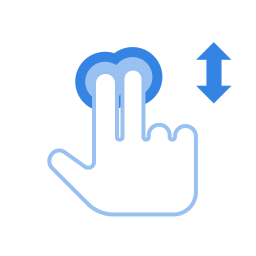
<p class="p">You can scroll using your touchpad using two fingers.</p>
<p class="p">When this is selected, tapping and dragging with one finger will work as
  normal, but if you drag two fingers across any part of the touchpad, it will
  scroll instead. Move your fingers between the top and bottom of your touchpad
  to scroll up and down, or move your fingers across the touchpad to scroll
  sideways. Be careful to space your fingers a bit apart. If your fingers are
  too close together, they just look like one big finger to your touchpad.</p>
<div class="note" title="Not">
<svg height="24" width="24" version="1.1">
 <g>
  <path class="yelp-svg-fill" d="m4 3h16c0.554 0 1 0.446 1 1v11h-6v6h-11c-0.554 0-1-0.446-1-1v-16c0-0.554 0.446-1 1-1z"></path>
  <path class="yelp-svg-fill" d="m17 16h4l-5 5v-4c0-0.554 0.446-1 1-1z"></path>
 </g>
</svg><div class="inner"><div class="region"><div class="contents"><p class="p">Two-finger scrolling may not work on all touchpads.</p></div></div></div>
</div>
<div class="steps"><div class="inner">
<div class="title title-steps"><h3><span class="title">Enable Two-finger Scrolling</span></h3></div>
<div class="region"><ol class="steps">
<li class="steps"><p class="p">Open the <span class="gui"><a href="../gnome-help/shell-introduction.html.tr#activities" title="Etkinlikler genel görünümü">Activities</a></span> 
      overview and start typing <span class="gui">Mouse &amp; Touchpad</span>.</p></li>
<li class="steps"><p class="p">Click on <span class="gui">Mouse &amp; Touchpad</span> to open the panel.</p></li>
<li class="steps"><p class="p">In the <span class="gui">Touchpad</span> section, make sure the <span class="gui">Touchpad</span>
      switch is set to on.</p></li>
<li class="steps"><p class="p">Switch the <span class="gui">Two-finger Scrolling</span> switch to on.</p></li>
</ol></div>
</div></div>
</div></div>
</div></section><section id="edgescroll"><div class="inner">
<div class="hgroup pagewide"><h2 class="title"><span class="title">Edge scroll</span></h2></div>
<div class="region"><div class="contents pagewide">
<div class="media media-image floatend"><div class="inner"><img src="figures/touch-edge-scroll.svg" class="media media-block" alt=""></div></div>
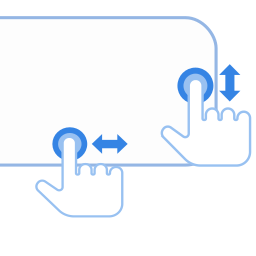
<p class="p">Use edge scroll if you want to scroll with only one finger.</p>
<p class="p">Your touchpad's specifications should give the exact
  location of the sensors for edge scrolling. Typically, the vertical
  scroll sensor is on a touchpad's right-hand side. The horizontal
  sensor is on the touchpad's bottom edge.</p>
<p class="p">To scroll vertically, drag your finger up and down the right-hand
  edge of the touchpad. To scroll horizontally, drag your finger across
  the bottom edge of the touchpad.</p>
<div class="note" title="Not">
<svg height="24" width="24" version="1.1">
 <g>
  <path class="yelp-svg-fill" d="m4 3h16c0.554 0 1 0.446 1 1v11h-6v6h-11c-0.554 0-1-0.446-1-1v-16c0-0.554 0.446-1 1-1z"></path>
  <path class="yelp-svg-fill" d="m17 16h4l-5 5v-4c0-0.554 0.446-1 1-1z"></path>
 </g>
</svg><div class="inner"><div class="region"><div class="contents"><p class="p">Edge scrolling may not work on all touchpads.</p></div></div></div>
</div>
<div class="steps"><div class="inner">
<div class="title title-steps"><h3><span class="title">Enable Edge Scrolling</span></h3></div>
<div class="region"><ol class="steps">
<li class="steps"><p class="p">Open the <span class="gui"><a href="../gnome-help/shell-introduction.html.tr#activities" title="Etkinlikler genel görünümü">Activities</a></span>
      overview and start typing <span class="gui">Mouse &amp; Touchpad</span>.</p></li>
<li class="steps"><p class="p">Click on <span class="gui">Mouse &amp; Touchpad</span> to open the panel.</p></li>
<li class="steps"><p class="p">In the <span class="gui">Touchpad</span> section, make sure the <span class="gui">Touchpad</span>
      switch is set to on.</p></li>
<li class="steps"><p class="p">Switch the <span class="gui">Edge Scrolling</span> switch to on.</p></li>
</ol></div>
</div></div>
</div></div>
</div></section><section id="contentsticks"><div class="inner">
<div class="hgroup pagewide"><h2 class="title"><span class="title">Natural scrolling</span></h2></div>
<div class="region"><div class="contents pagewide">
<p class="p">You can drag content as if sliding a physical piece of paper using the
  touchpad.</p>
<div class="steps"><div class="inner"><div class="region"><ol class="steps">
<li class="steps"><p class="p">Open the <span class="gui"><a href="../gnome-help/shell-introduction.html.tr#activities" title="Etkinlikler genel görünümü">Activities</a></span> 
      overview and start typing <span class="gui">Mouse &amp; Touchpad</span>.</p></li>
<li class="steps"><p class="p">Click on <span class="gui">Mouse &amp; Touchpad</span> to open the panel.</p></li>
<li class="steps"><p class="p">In the <span class="gui">Touchpad</span> section, make sure that the
     <span class="gui">Touchpad</span> switch is set to on.</p></li>
<li class="steps"><p class="p">Switch the <span class="gui">Natural Scrolling</span> switch to on.</p></li>
</ol></div></div></div>
<div class="note" title="Not">
<svg height="24" width="24" version="1.1">
 <g>
  <path class="yelp-svg-fill" d="m4 3h16c0.554 0 1 0.446 1 1v11h-6v6h-11c-0.554 0-1-0.446-1-1v-16c0-0.554 0.446-1 1-1z"></path>
  <path class="yelp-svg-fill" d="m17 16h4l-5 5v-4c0-0.554 0.446-1 1-1z"></path>
 </g>
</svg><div class="inner"><div class="region"><div class="contents"><p class="p">This feature is also known as <span class="em">Reverse Scrolling</span>.</p></div></div></div>
</div>
</div></div>
</div></section><section class="links" role="navigation"><div class="inner">
<div class="hgroup pagewide"></div>
<div class="contents pagewide"><div class="links guidelinks"><div class="inner">
<div class="title"><h2><span class="title">Daha Çok Bilgi</span></h2></div>
<div class="region"><ul><li class="links ">
<a href="../gnome-help/mouse.html.tr" title="Mouse, Touchpad &amp; Touchscreen">Mouse, Touchpad &amp; Touchscreen</a><span class="desc"> — Adjust the behavior of pointing devices to meet personal requirements.</span>
</li></ul></div>
</div></div></div>
</div></section>
</div>
<div class="clear"></div></article><footer><div class="inner pagewide"><div class="about ui-expander" role="contentinfo">
<div class="yelp-data yelp-data-ui-expander" data-yelp-expanded="false"></div>
<div class="inner">
<div class="hgroup"><h2><span class="title">Hakkında</span></h2></div>
<div class="region"><div class="contents">
<div class="copyrights">
<div class="copyright">© 2021, 2023. Sabri Ünal</div>
<div class="copyright">© 2021, 2023. Emin Tufan Çetin</div>
</div>
<div class="credits">
<div class="credits-authors">
<div class="title"><span class="title">Yazan(lar):</span></div>
<ul class="credits"><li>Shaun McCance</li></ul>
</div>
<div class="credits-editors">
<div class="title"><span class="title">Düzenleyen(ler):</span></div>
<ul class="credits">
<li>Michael Hill</li>
<li>Ekaterina Gerasimova</li>
<li>Emanuel Cisár</li>
</ul>
</div>
<div class="credits-translators">
<div class="title"><span class="title">Çeviren(ler):</span></div>
<ul class="credits">
<li>Sabri Ünal</li>
<li>Emin Tufan Çetin</li>
</ul>
</div>
<div class="credits-blank"></div>
</div>
<div class="license">
<div class="title"><span class="title">Lisans</span></div>
<div class="contents"><p class="p">This work is licensed under a <span class="link"><a href="https://creativecommons.org/licenses/by-sa/3.0/" title="https://creativecommons.org/licenses/by-sa/3.0/">Creative
  Commons Attribution-ShareAlike 3.0 Unported License</a></span>.</p></div>
</div>
</div></div>
</div>
</div></div></footer>
</div></main>
</body>
</html>