Ezarpen azkarrak
The Quick Settings buttons in the system menu let you quickly switch available services on or off, and choose Bluetooth devices or Wi-Fi networks.
Wifia
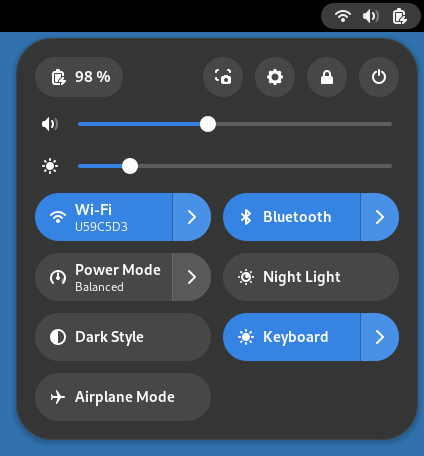
Sakatu Wifia botoia wifia aktibatu eta desaktibatzeko.
Botoiak unean konektatuta dagoen wifi-sarea erakusten du.
Sakatu  erabilgarri dauden sareak ikusteko.
Hautatu sare bat konexioa abiarazteko edo hautatu Sare guztiak wifiaren ezarpenen panela irekitzeko.
Hariduna
Press the Wired button to switch wired networking off or back
on. The button shows information about the current wired network connection.
Press
to show more settings. Select Wired Settings
to open the Network settings panel.
Bluetootha
Press the Bluetooth button to switch bluetooth off or back on.
The button shows the name of the first device, or the number of devices
connected. Press
to show paired and connected Bluetooth devices. Select one to
connect or disconnect. Select Bluetooth Settings to open the
Bluetooth settings panel.
Energiaren modua
The Power Mode button shows the current
power mode setting. Press the button to
switch to Power Save or back to the current setting. Press
to select from all modes. Select Power Settings to
open the Power settings panel.
Aktibatzea/desaktibatzea
Beste botoiek gaueko argiaren, estilo ilunaren, hegazkin moduarren edo teklatuaren atzeko argiaren egoera erakusten dute, aukera horiek existitzen badira. Sakatu botoia haiek aktibatu eta desaktibatzeko.
Atzeko planoko aplikazioak
Sisteman atzeko planoan exekutatzen ari diren aplikazioak sistema-menuaren beheko aldean bistaratzen dira. Egin klik aplikazio horien zerrenda bat ikusteko. Zerrendako aplikazioetako bat hautatzean, leiho bat irekitzen da eta Atzeko planoko aplikazioak ataletik kentzen da. Hautatu Aplikazio-ezarpenak Aplikazioak ezarpenen panela irekitzeko.